
A website of this type recently created for a client:Liuzhou Rongkai Trading Co., Ltd. – Official Website of the IASE Brand
This is designed forCreative professionalsAnd various types of business websitesA WordPress portfolio theme. With its modern design,Elementor Integrated and versatileGallery module—it is ideal for creative work, professional services, and dynamic video displays. This premium theme offersFull-screen slideshowsAnd customizable layouts, it is perfect for entrepreneurs, photographers, and agencies.

Our WordPress video portfolio themes (such as Inspiro and Reel) allow you to set a video as a background for a slideshow.
Features like this are also available in popular page builders such as Beaver Builder, allowing you to easily set a video as the background for a section.
While a video background can look great and capture visitors' attention, you should exercise caution and ensure that...When using self-hosted videos...before uploading them to your website. Configure these details in
Adding a video background to your website
Showcasing a video on your website's homepage is crucial for boosting traffic and engagement. Nearly 58% of businesses use video on their homepages. It is the best way to capture the attention of visitors the moment they land on your site.
Donec nec justo eget felis facilisis fermentum. Aliquam porttitor mauris sit amet orci. Aenean dignissim pellentesque felis.
4 ways to add a video background in WordPress
There are several ways to add a video background to your WordPress site. However, first, you must locate and upload your video—either to your own website or to a third-party platform.
You can use your own video or download one from a free stock video platform. Once you have selected a video, there are several ways to upload it and obtain a link that you can then use:
- Self-hosted: Upload your background video directly to the "Media" section of your WordPress site.
- YouTube/Vimeo videos: Upload your video to YouTube or Vimeo and obtain a direct link to it.
Now that you have your video, you can add it to your website using one of the following methods:
- Use a WordPress theme with built-in video functionality
- Use the "Cover" block
- Use a video background plugin
- Use a page builder

Use a WordPress theme designed for video
Some themes include built-in video background options, making it easier to create an impressive experience for your website visitors.
One example of such a theme is Inspiro Lite—a free theme well-suited for portfolios and business websites.
To add a background in Inspiro Lite:
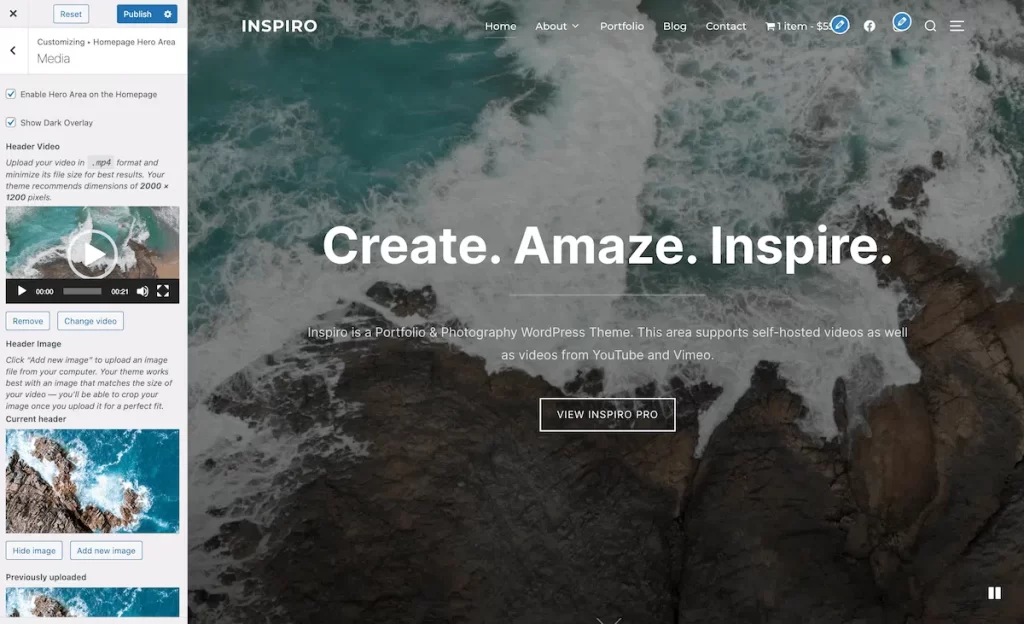
- Go to Appearance > Custom > Main homepage area > Media。
- You can [get one] from...In the media librarySelect a video, or add a link from YouTube or Vimeo.
- Once the video is added, you can preview it directly within the Customizer.
- Click... Publish ...button, and a video background will appear on your website's homepage.
How to optimize self-hosted video backgrounds
Here are some tips for using video backgrounds without compromising your website's speed:
-
- Keep video file sizes small. Try using HandBrake The application compresses and reduces the video quality to achieve approximately... 5-10 MB ...video. Any file larger than this will take longer to load, particularly on mobile devices with slower data connections.
- Try to keep it to [X] per second 24 framesAnd export with a low bitrate 720p. You can [optimize] here... HandBrake :
You don’t need to worry too much about video quality; it is more important to optimize the video properly and ensure it loads quickly. - From videoRemove the audio. Browsers typically do not play audio when it is in the background; including audio only serves to increase file size.
- Keep your videos as short as possible. In most cases,30 seconds...is sufficient. Videos longer than one minute take too long to load, especially on mobile devices with slower connections.
- If you require higher resolution, longer duration, or audio tracks, consider using a "video lightbox" feature alongside an optimized video background.
Use a GIF animation as a featured image!
-
You can also set a GIF file as a featured image so that it plays on all devices. You can convert your video file into a GIF using an online converter.
This theme style can be used in conjunction with WooCommerce to build an e-commerce website for international trade.
To have a site created, please contact the site administrator using the contact information provided at the bottom of the page.