


Zibi Theme Dashboard: Global Settings – Custom Code – Adding Custom CSS Styles:
/* 免费资源:背景湖蓝,文字白色 */
.meta-pay.but.jb-yellow{
    background:#1cbabc !important;
    border-color:#1cbabc !important;
    color:#222 !important;
}

/* 积分付费:背景湖蓝,文字白色 */
.meta-pay.but.jb-green{
    background:#1cbabc !important;
    border-color:#1cbabc !important;
    color:#222 !important;
}

/* 现金付费:背景湖蓝,文字白色 */
.meta-pay.but.jb-red{
    background:#1cbabc !important;
    border-color:#1cbabc !important;
    color:#222 !important;
}
Preview (you can replace the color `#1cbabc` with a color of your choice)

You can also use the official method: first, locate.../wp-content/themes/zibll/inc/functionsUnder the directory/category section: zib-posts-list.php Once opened, search for "Free Resources" (免费资源) as shown in the image below.
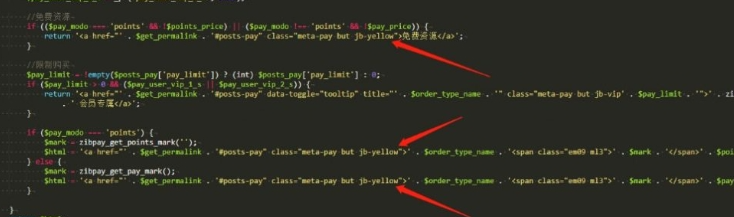
First item: background color for "Free Resources"
Second item: background color for "Points-based Paid Resources"
Third item: background color for "Paid Resources"
Simply change the colors in the image above to your preferred choices. A list of CSS classes is provided below for your reference.
List of CSS classes
| class | Style | class | Style | class | Style |
|---|---|---|---|---|---|
| c-red | Red text | b-theme | Theme background color | jb-red | Gradient red background |
| c-yellow | Orange text | b-red | Red background | jb-yellow | Gradient orange background |
| c-blue | Blue text | b-yellow | Orange background | jb-blue | Gradient blue background |
| c-blue-2 | Dark blue text | b-blue | Blue background | jb-green | Gradient green background |
| c-green | Green text | b-green | Dark blue background | jb-purple | Gradient purple background |
| c-purple | Purple text | b-purple | Purple background | jb-vip1 | Gradient gold background |
| jb-vip2 | Gradient black background |
In my opinion, the provided list of classes offers too few color options—it feels more like choosing from a pre-set menu rather than true customization. I recommend the first method: instead of modifying files on the server, you can simply add custom CSS via the backend—it’s both more convenient and more secure.

Other Articles


No Comment! Be the first one.